Trainspotting
How to track freight trains in the UK
A locomotive hauling a long line of containers is worth looking up for. Catching it takes a little more planning than checking the next passenger departure.
A timetable might show a freight train booked through your station at 14:20. What you really want to know is whether it has left its terminal, which way it is heading and how close it is now.
To track freight trains in the UK, find a service in a detailed timetable, check for actual movement reports, then follow its progress on a live railway map. Use Lineside Spotter to find promising times and places, Realtime Trains to inspect services, and Traksy or OpenTrainTimes to follow them where map coverage is available.
This guide focuses on the mainline railway in England, Scotland and Wales. The same coverage should not be assumed for Northern Ireland or preserved railways.
Enjoy watching freight from home? Lineside Inkbrings approaching trains to a small e-paper display on your desk, shelf or windowsill. Once set up, there's no app to open. Check your railway.
In this guide
1. Find a promising place and time
Start with somewhere you can actually watch: your local station, a public viewpoint or the railway near your home.
In Lineside Spotter, search for a station and explore the day's expected activity. Look at the freight movements and the suggested periods with the most freight, then choose a time that suits you.
For example, the Doncaster page separates the busiest period overall from the period with the most booked freight. Those can be different, so a busy passenger railway does not automatically mean plenty of freight at the time you visit.
Spotter helps you plan around the timetable. Its counts represent booked movements, and suggested train types are inferred from planning data. Use it to find possibilities, then check live running information before setting out.
If you're watching between stations, make sure your chosen location is on the same line. A nearby junction may send a service onto a different route before it reaches your viewpoint.
2. Find the freight service in Realtime Trains
Open Realtime Trains' Detailed Search and look up your station or railway location.
- Select the date you want to watch.
- Choose a time window broad enough to include the services you are interested in.
- Include non-passenger services in the results.
- Open a likely freight service and inspect its origin, destination and route.
Non-passenger results can include empty passenger trains and locomotive movements as well as freight. Check the service details rather than assuming every entry is a train of wagons.
You may see terminal, yard or siding names instead of familiar passenger stations. Follow the service's location list to see whether it passes your chosen point, and in which direction.
Freight timings can appear only a few days before departure, according to Realtime Trains' search guidance. An empty search for a date well ahead is a reason to check again closer to the day.
3. Check whether the freight train is actually running
This is the most useful habit to learn: look for a recent actual report before treating a timetable entry as a train on its way.
| What you see | What it tells you |
|---|---|
| A booked time | The service has a place in the timetable. |
| An activated service | It has been called in the railway's operating system; departure is not confirmed. |
| An actual departure or passing report | There is recorded evidence of progress at that location and time. |
| A later estimate | A prediction of what happens next, which can change. |
Realtime Trains explains that some freight services are activated automatically even when they do not subsequently run. Its help page identifies bold times in the realtime section as actual reports.
Look along the route for the latest one. A fresh passing report upstream is more useful for judging an approach than an activation or an old departure report.
If Realtime Trains shows (Q), its help describes an as-required service that has not been activated. Missing data can complicate that indication, so it is not absolute proof of a cancellation.
Read the last report, not just the next estimate
Suppose a train is booked past your station at 14:20. Its service page shows an actual departure from a terminal at 13:42 and an actual pass at an intermediate junction at 14:03.
Those reports give you evidence of its journey. You can now look for further progress towards your station.
If the only actual report is from much earlier, check again before making a special trip. The train may have stopped, or the next update may be missing. A report tells you where it was at that moment, not that it has kept moving ever since.
These times are an illustrative example, not a live service.
4. Follow its progress on a live railway map
Open Traksy or OpenTrainTimes' maps for the area around your chosen location.
These are track diagrams. Use the station names, junctions and line connections to orient yourself.
On Traksy, choose a station and select Map. Its guide to map codes explains how to open a service summary or possible timetable matches. On OpenTrainTimes, many train descriptions can be selected to open the associated schedule.
Watch the train's code move through successive positions towards you. At a junction, check which branch it takes before assuming it will pass your viewpoint.
OpenTrainTimes explains that its diagrams use signalling information: a train description moves between positions known as berths. The displayed position is not a continuous GPS dot.
A map is useful evidence, but it cannot always explain a pause. A train may be waiting, or an update may be missing. Service matching can also be imperfect. Check the route and recent reports together.
Can you find out which locomotive is hauling it?
Sometimes, but a service's identity and its locomotive's identity are separate pieces of information.
There are three different questions:
- Which service is this? Its route, timetable and reporting identity.
- What type of locomotive is it? For example, a Class 66.
- Which individual locomotive is it? The number carried by that particular engine.
A timetable's timing load describes assumptions used to calculate its timings. It does not confirm the actual locomotive or even guarantee the displayed type will work the service. Realtime Trains explains that distinction in its article about timetable and train data.
For a particular locomotive, look for an explicit allocation or a reliable recent sighting of that service. Keep sightings tied to their date and location; yesterday's engine may not be today's.
Why did the train disappear, change time or fail to appear?
A few checks can help you work out what the information is really saying.
It has a timetable but no movement reports. You have a planned service, with no reported progress to rely on yet. Check closer to its booked start.
The estimate keeps changing. Look at the most recent actual report and the live map. The new estimate may reflect a delay, a hold or limited new information.
It appears on the map but won't open a timetable. The description may not have been matched successfully. This does not establish that the movement is unscheduled.
It vanishes at the edge of a diagram. Open the adjacent map where available. A gap between maps or reporting areas is not evidence that the train has been cancelled.
You can't see it anywhere. Recheck the date, location and route. Coverage varies, and some railway areas lack automatic movement reporting. OpenTrainTimes describes these limitations in its service disclaimer.
If an actual report shows the train running ahead of its booked time, work from that report. Waiting for the original timetable time could mean missing it.
What if a freight train has already passed?
Note the time, direction and what you saw: containers, tanks, open wagons, the locomotive's colours or its number.
Search the detailed timetable around that time and compare actual reports with your observation. Allow for the distance between your viewpoint and the reporting location.
On a busy line, several services may be plausible. The closest booked time alone is not enough to identify the train.
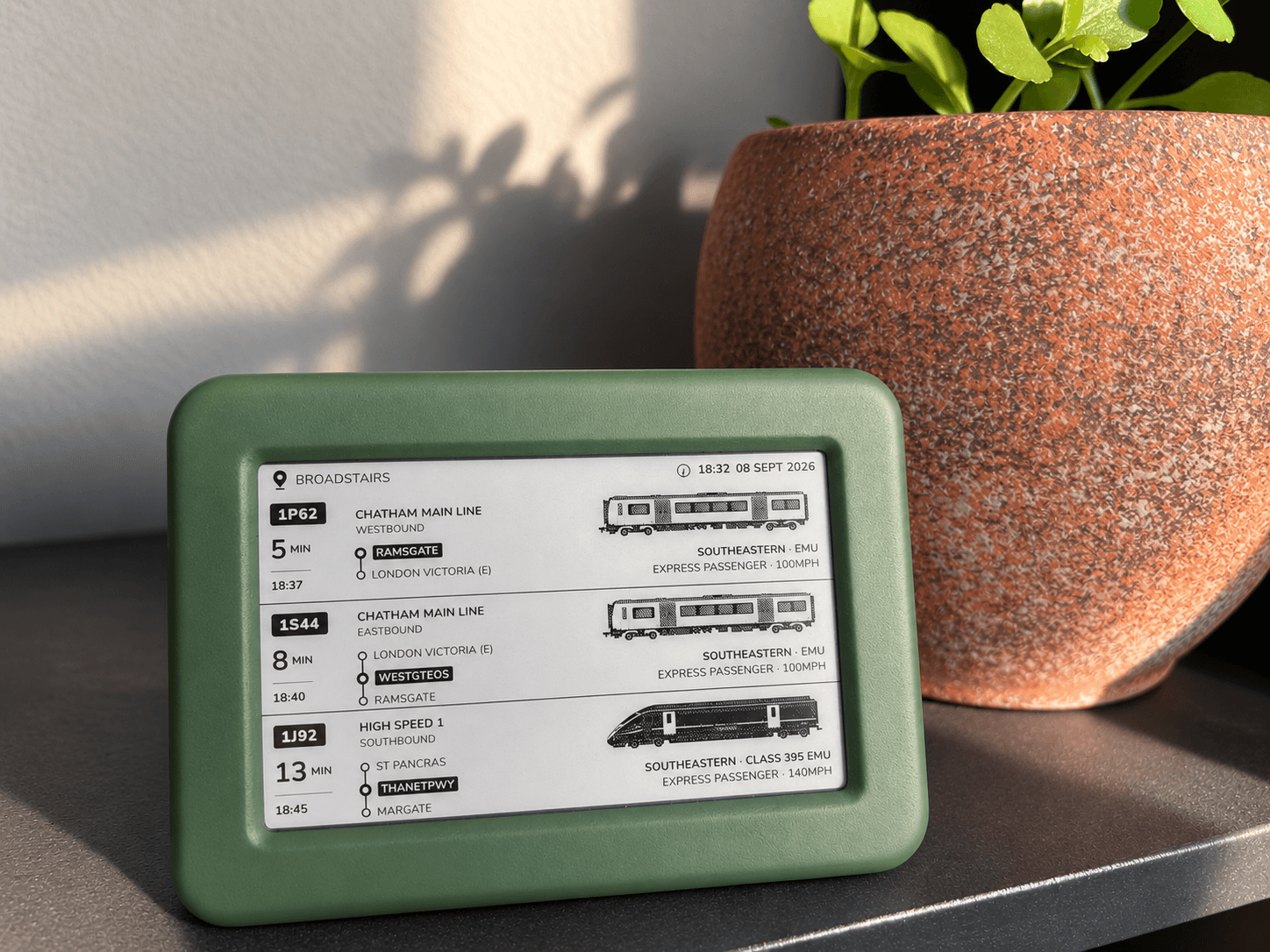
Our own creation
Follow approaching freight from home
Sometimes you want to investigate a particular working. Other times, you just want to know when something interesting is coming past.
That everyday curiosity is why I built Lineside Ink. My children enjoyed watching the railway near our home, and I wanted us to see what was approaching with a glance.
The display follows live railway movements to estimate which trains are heading towards your chosen location. Freight and non-stopping passenger services can appear alongside stopping trains, where the data is available.
It can also consider an approaching movement when your location is missing from that train's timetable. Matching service information adds detail where possible. You can read how the predictions work.
The e-paper screen uses reflected light, and the display updates over Wi-Fi after setup. Put it somewhere you naturally look during the day and the next passing freight becomes something to look forward to.
Check display coverage for your railway. Spotter's timetable coverage and the display's live prediction coverage are different.
Which freight-tracking tool should you use?
| Your aim | A useful starting point |
|---|---|
| See approaching freight from home with a glance | Lineside Ink, at a supported location |
| Choose a promising time to watch | Lineside Spotter, using expected timetable activity |
| Inspect a particular service and its reports | Realtime Trains' Detailed Search |
| Follow progress through a covered signalling area | Traksy or OpenTrainTimes |
If you're heading out, watch from a permitted public location. At stations, follow staff instructions and stay behind the yellow line; National Rail's guidance for enthusiasts explains visiting and photography.
Start by looking up a station in Lineside Spotter. Pick one freight service, check its latest actual report and follow its progress. A few familiar locations soon make the railway much easier to read.