Skip to content
Lineside Ink

Live train display vs departure board

Some of the best trains don’t stop.

There’s more happening on the railway than the services calling at your station. Express trains pass through, freight moves across the network, and other workings can appear throughout the day.

Departure boards are designed to help passengers see the services they can catch. Lineside Ink takes a different view: it follows approaching trains on the railway around you, including passenger services passing through and freight, and brings them to a railway display in your home.

Expected price: £149 · No subscription required
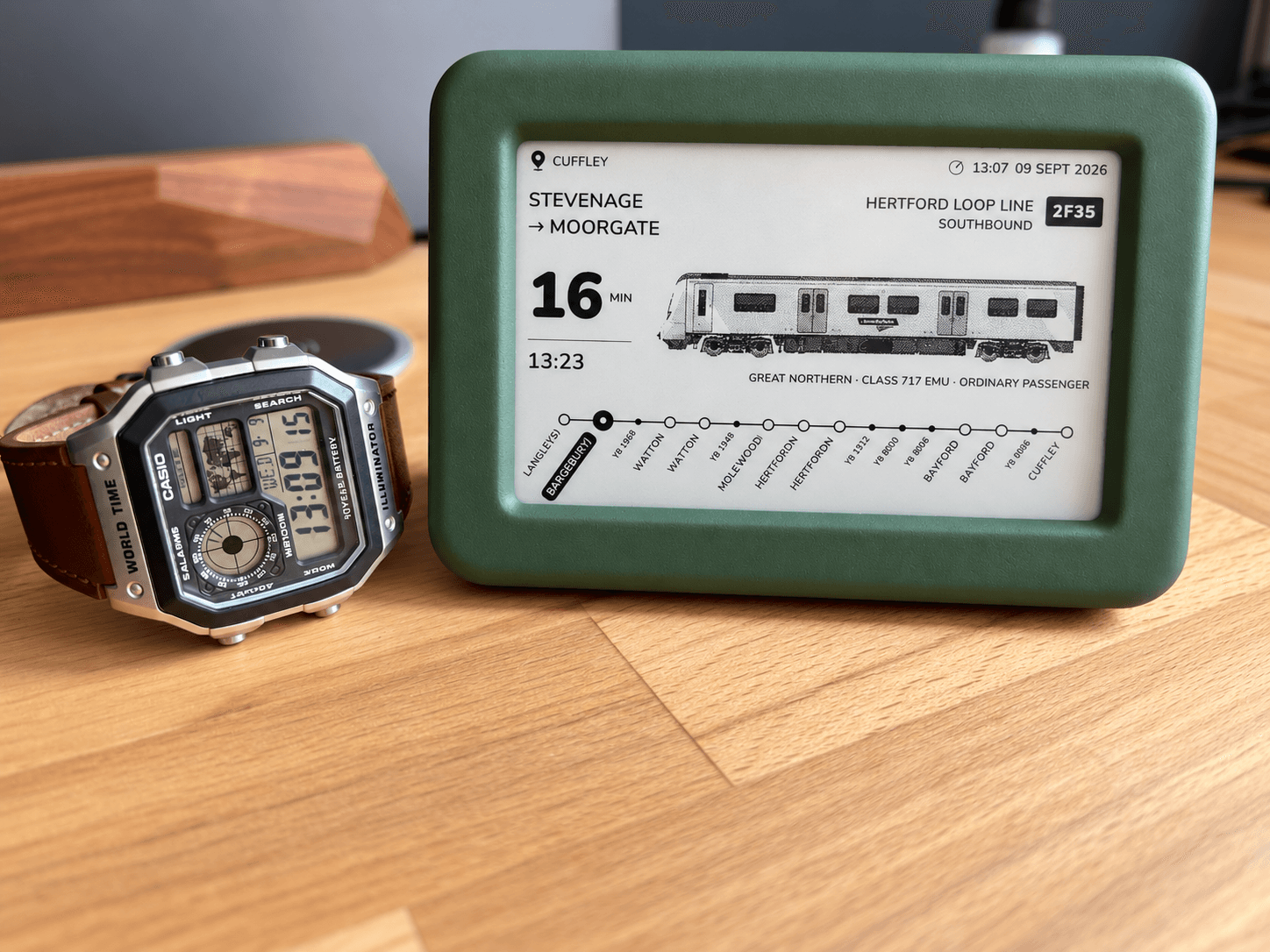
The green Lineside Ink display on a wooden desk beside a wristwatch, its screen showing a Great Northern service approaching Cuffley on the Hertford Loop Line.

The screens, up close

Five ways to enjoy the same railway.

A departure list gives you that familiar station view. Lineside’s screens let you spend time with an individual train, follow several approaches, look back at the last passing service or see the surrounding line and the day’s activity.

01

Next Train

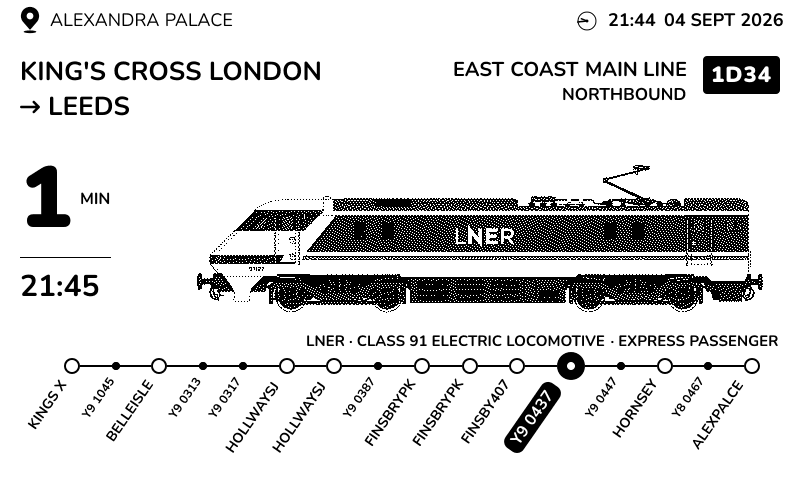
An LNER Class 91 working King's Cross to Leeds on the East Coast Main Line, one minute from Alexandra Palace at 21:45, with its position marked on a diagram of the line.
One approaching train gets the whole screen: its headcode, route, estimated arrival and an illustration of the train type where available. A small line diagram adds context to your next glance.
02

Next Three

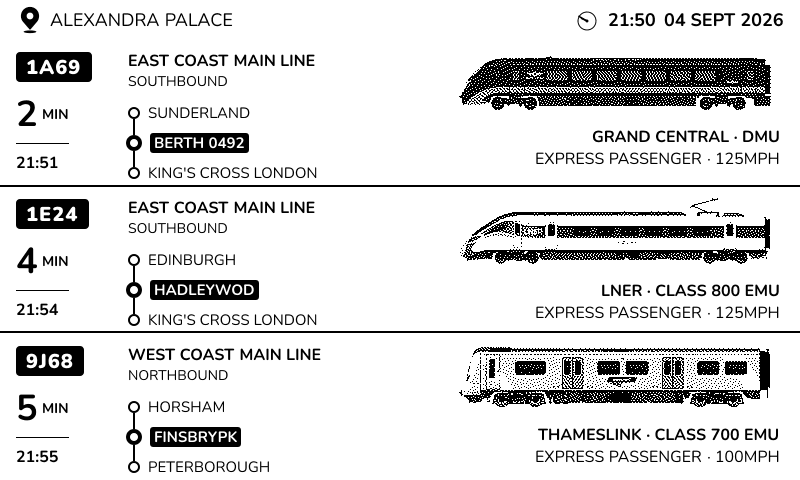
Three approaching services listed with their headcodes, routes and arrival times: a Grand Central DMU in two minutes, an LNER Class 800 in four and a Thameslink Class 700 in five.
Keep three approaching services in view together. Passenger trains and freight share the list, including services passing through, with estimates for reaching your chosen location.
03

Next & Last

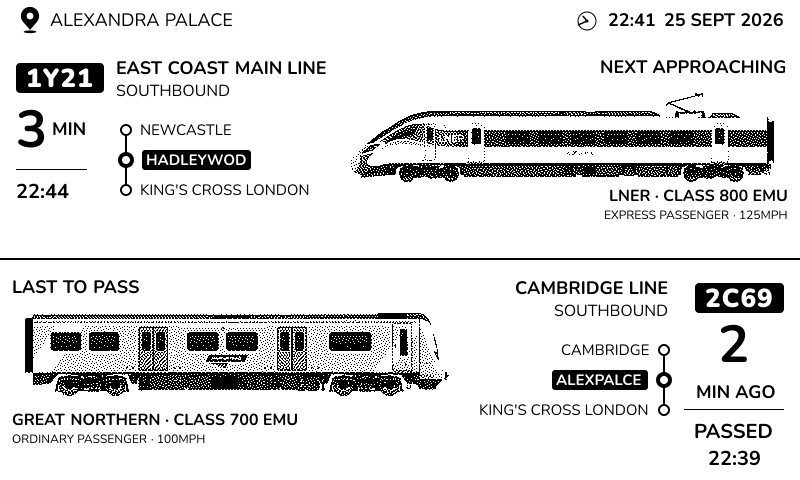
Next & Last at Alexandra Palace: a Hull Trains Class 800 approaching in one minute, above a Class 66 freight train that passed one minute ago.
The screen pairs the next approaching train with the last one recorded passing your location. Look up what you just heard without losing sight of what is coming next.
04

Schematic

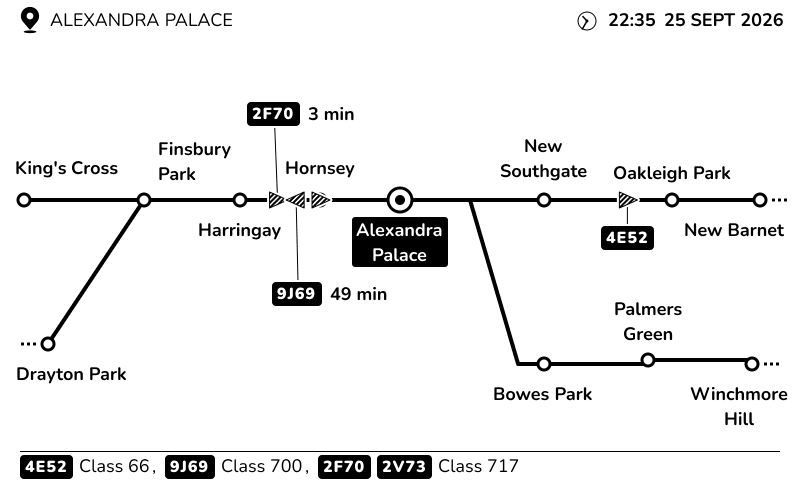
Schematic view of the railway around Alexandra Palace, with nearby stations, the Hertford Loop junction and trains labelled by headcode.
See the railway around your selected location as a line diagram, with nearby stations, junctions and reported train positions. Headcodes help you follow the activity across the line rather than one service at a time.
05

Stats

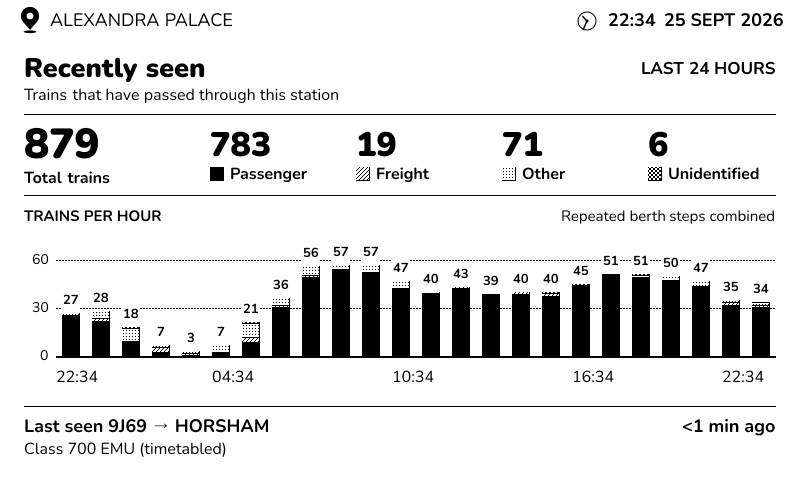
Stats at Alexandra Palace showing 879 recorded trains over the last 24 hours, a breakdown by train category and a trains-per-hour chart.
Get a feel for the day’s railway: a total for the last 24 hours, a breakdown of passenger, freight and other recorded trains, and an hourly activity chart. There is something to explore between passing trains, too.

A favourite railway.
A different view whenever you like.

Every view follows the location you choose. Keep an eye on the next arrival, watch the surrounding line or settle into the rhythm of a whole day.

Example screen captures. Train details, positions and estimates depend on the railway data available.

It starts with a moving train.

As trains move along the railway, the signalling system reports their progress. Lineside uses these live updates to work out which trains are likely to reach your chosen location and estimate when they’ll arrive.

Timetable information adds details where a matching service is available. A train doesn’t need a scheduled stop at your location to appear.

How Lineside works →

Which view would you enjoy at home?

A little piece of the station

A home departure board brings the pleasure of the station concourse into your room. If you enjoy watching passenger services and destinations come and go in that familiar format, it can be a lovely fit. Individual products offer different views and features.

A window onto the passing railway

Lineside is for the express that makes you look up, the freight you hear in the distance and the question of what just went past. Its e-paper screen suits a quiet glance from your desk or shelf, with different views to match what catches your interest.

There’s room to enjoy both. With Lineside, connect to Wi-Fi, choose your railway and switch views using the buttons on the display. The live railway service is included, with no subscription required.

Explore the display and specifications →

A few useful things to know.

Does a train have to stop at my station to appear?
No. Lineside follows approaching trains using live railway reports, so a scheduled stop isn’t needed. Stopping passenger services, expresses passing through and freight can all appear where the live data is available. The time shown is an estimate of when a train will reach your chosen location.
How do I change the screen mode?
Use the buttons on the display to switch between Next Train, Next Three, Next & Last, Schematic and Stats. Choose a close look at one train, a view of several approaches, the surrounding railway or the day’s activity. You can try the views on the interactive display on our homepage.
Can I follow a railway miles from home?
Yes. Your display connects over Wi-Fi, so it doesn’t need to be near the railway you follow. Choose from around 4,000 supported locations across Great Britain’s mainline railway. You can save up to 100 favourite locations and change them after setup. Follow somewhere local, a station you remember fondly or a busy junction further afield. Check your railway before ordering.
What does it show when no train is approaching?
When no train is expected within the next 60 minutes, the display shows activity statistics for your chosen location. You can explore the last 24 hours, including recorded passenger and freight totals and an hourly activity chart, while you wait for the next train.
What do I need to set it up?
A 2.4 GHz Wi-Fi connection with internet access and a web browser on your phone or computer. There’s no app to install. Connect the display, choose your railway and it updates on its own. You can use it on battery power or leave it connected by USB-C.
Is there a subscription for the live data or screen modes?
No subscription required. The live railway service and all 5screen views are included with your Lineside Ink. There’s no separate subscription to unlock a mode.
Will it show every train?
No. Lineside relies on live railway reports and predictions about where a train is heading. Gaps in the data or a change of route can mean a train is missing or its estimate changes. Some trains appear with fewer details than others.
Can I use it to decide when to catch my train?
Use official passenger information for departure times, platforms and travel decisions. Lineside’s estimates are intended to help you follow railway activity at the location you’ve selected.

What’s passing your favourite station?

Follow the railway near home, a station you remember fondly, or somewhere you’ve always wanted to watch. Choose from around 4,000 supported locations across Great Britain’s mainline railway. You can follow somewhere miles away from your display.

Check your railway →

Want one for your home?

Join the waiting list and we’ll email you when orders open.

Expected price: £149 including VAT and delivery to the UK and Isle of Man.

No subscription required. We’ll confirm the final price and delivery timing before orders open.

Free to join. No payment or commitment to buy. We’ll use your email to let you know when orders open. See our privacy notice.

We’ll only email you when orders open.